How to Clean a Mechanical Keyboard
Clean a mechanical keyboard without damaging switches or keycaps: safe tools, a quick routine, careful keycap removal and deep-clean steps.
To clean a mechanical keyboard, disconnect its power, remove loose dust with a soft brush, then wipe the accessible surfaces with a barely damp microfibre cloth. That is enough for most routine cleaning. If dirt has collected beneath the keycaps, remove compatible keycaps carefully, wash them separately if their manufacturer allows it, and let them dry completely before reinstalling.
Cleaning is not the same as taking a keyboard apart. You do not need to pull out switches, open the case or touch the circuit board just to get crumbs off the plate.
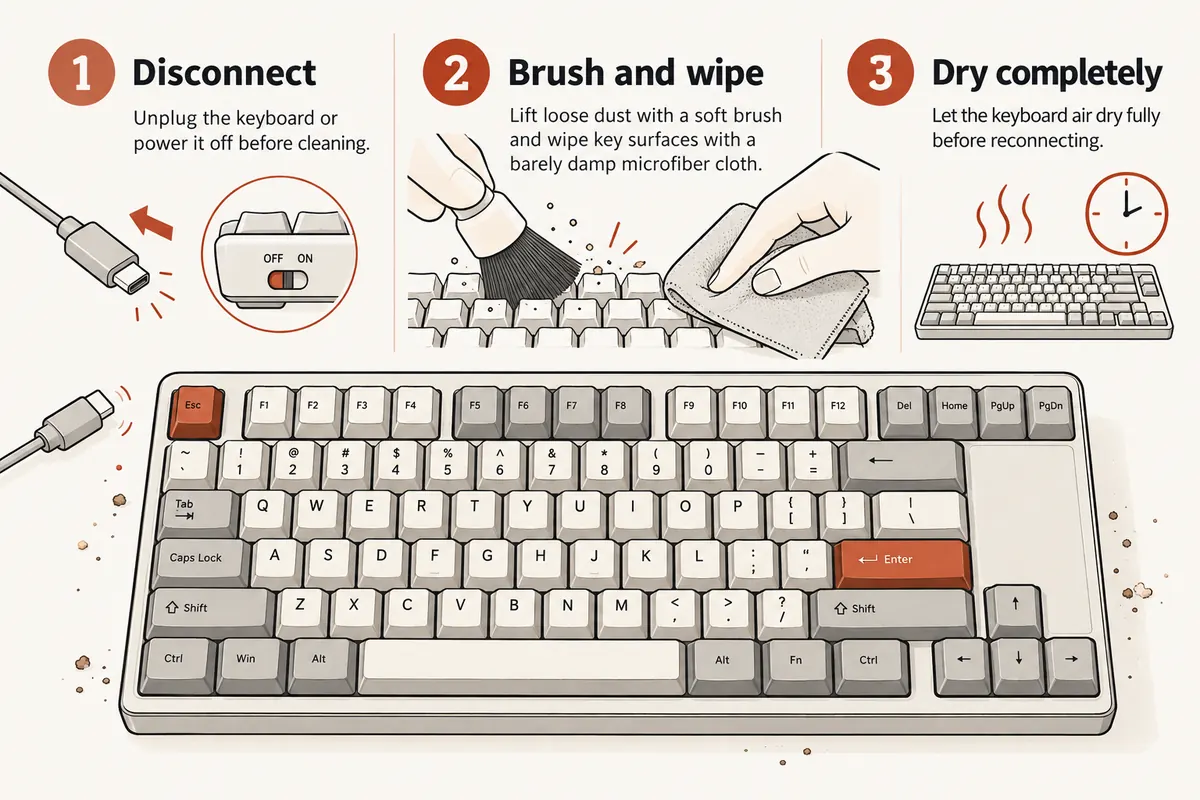
The important boundary: cleaning the outside is routine maintenance. Water inside a switch or on a powered circuit board is not.
What you need
- A soft brush. A clean, soft paintbrush or dedicated keyboard brush loosens dust around the keys.
- Two microfibre cloths. One for a lightly damp wipe, one to dry the surface.
- A wire keycap puller. Only for a deeper clean on a keyboard with removable keycaps.
- A bowl, lukewarm water and mild dish soap. Only for detached, washable keycaps.
- Cotton swabs, optionally. Useful around case edges, not for pushing liquid into switch openings.
You do not need a switch puller, solvent bath or full-size vacuum. If using a small keyboard vacuum or low-pressure air, follow your keyboard maker’s advice, keep the nozzle away from switch openings and avoid forcing debris deeper into the board. A brush is the simplest starting point.
Before cleaning: disconnect and check the board
Unplug a wired keyboard. For a wireless one, switch it off and remove removable batteries if the instructions permit. Move drinks away from the desk.
Take a photograph of the layout before removing any keycaps. This matters especially for 75%, 65% and non-standard layouts, where a similar-looking keycap might belong to a different row or position.
Check the manufacturer’s care instructions for your exact board and keycap finish. Some surfaces are painted, coated, printed or made of materials that should not be soaked. An external wipe is usually safer than assuming every cap can go into soapy water.
The quick clean: five minutes, no keycap removal
- Lift away the loose debris. With the keyboard unplugged, turn it over gently and tap out crumbs. Do not shake a heavy board violently or bang it on the desk.
- Brush between the rows. Work slowly around the edges of each cap. Catch the dust with a cloth instead of sweeping it into switch stems.
- Wipe the tops of the keys. Use a microfibre cloth dampened with a little water, not wet enough to drip when squeezed. Never spray cleaner directly onto the keyboard.
- Dry the surface. Follow with the dry cloth, then let any remaining moisture evaporate before powering on.
For ordinary fingerprints, that is the whole job. Removing keycaps every week creates more opportunities to bend a stabiliser, break a stem or lose a small part without making the board meaningfully cleaner.
The deeper clean: remove the keycaps carefully
A deeper clean makes sense when dust and hair are trapped on the plate under the keys. Do this only if your keycaps are designed to be removable.
Start with a single ordinary letter key. Hook both sides with a wire keycap puller and pull upwards with even pressure. Keep the motion in line with the switch stem. Do not lever the cap from one corner.
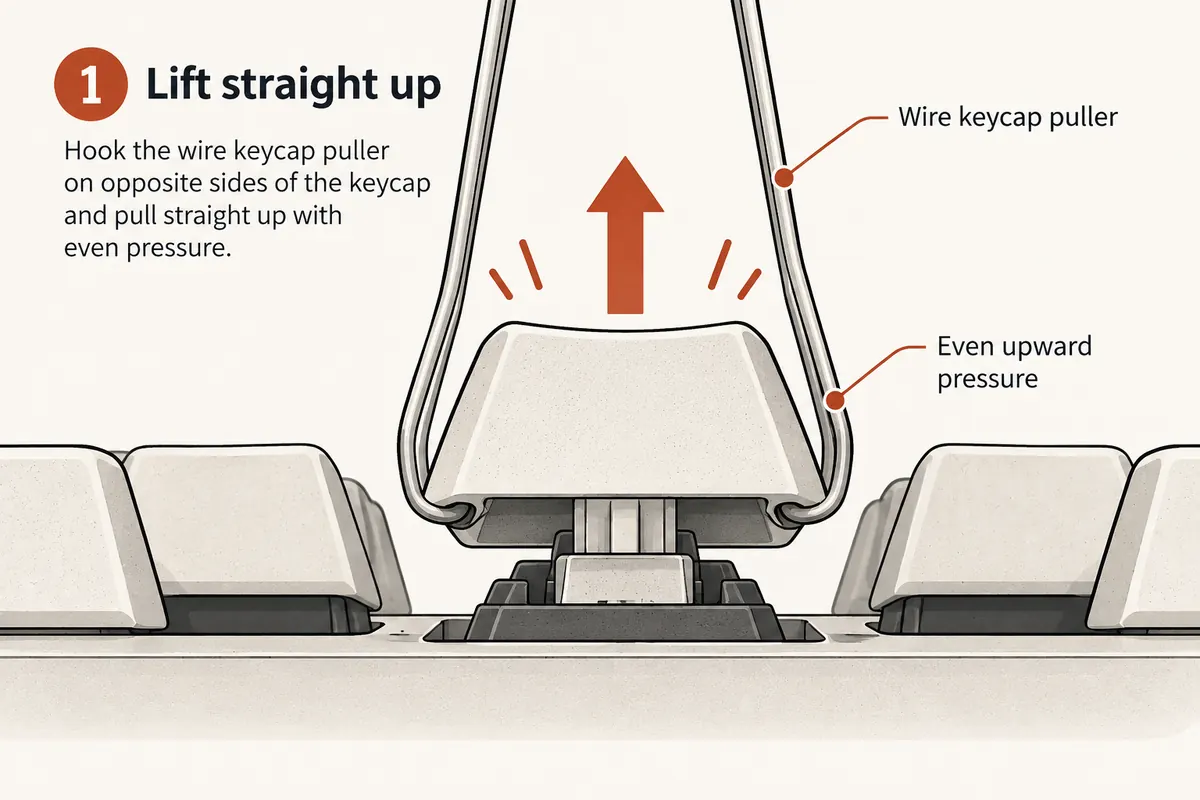
Use even upward pressure. This is a schematic of an MX-style keycap, not a guarantee that every keyboard uses the same attachment.
Large keys are different. Space, Enter, Backspace and Shift may have additional stabiliser mounts or clips. If one resists, stop and check its construction rather than forcing it. Our stabiliser guide explains why wide keys have extra parts.
Keep the removed keycaps in order or group them by row, using your photo for reassembly. Some sculpted keycap profiles have different shapes between rows, so a cap that fits a switch stem may still be in the wrong position.
Clean the exposed plate and case
Brush visible dust towards an open edge and collect it with a cloth or suitable small keyboard vacuum. Keep bristles gentle around switch stems and stabiliser mechanisms. Wipe the case edges with the slightly damp cloth, then dry them.
Do not drip alcohol, soapy water or any cleaner into an assembled switch. Do not scrape the contacts or attempt to clean the PCB as part of a routine surface clean. If the grime is inside a switch rather than around it, that is a repair question, not a reason to soak the keyboard.
Can you wash mechanical keyboard keycaps?
Often yes, but only when they are removed and their material and finish are suitable. Plain ABS or PBT plastic caps can commonly be washed using lukewarm water and a small amount of mild dish soap. Follow the set maker’s guidance, particularly for coated, painted, wooden, metal or specialty caps.
- Put only the detached compatible keycaps in a bowl of lukewarm, mildly soapy water. Do not use hot or boiling water.
- Gently agitate them with your hands or a soft cloth. Avoid abrasive pads that could scratch a finish or printed legend.
- Rinse until no soap remains.
- Spread the caps out on a clean, absorbent cloth and allow them to air dry. Turn and inspect each one so water cannot remain trapped inside the stem socket.
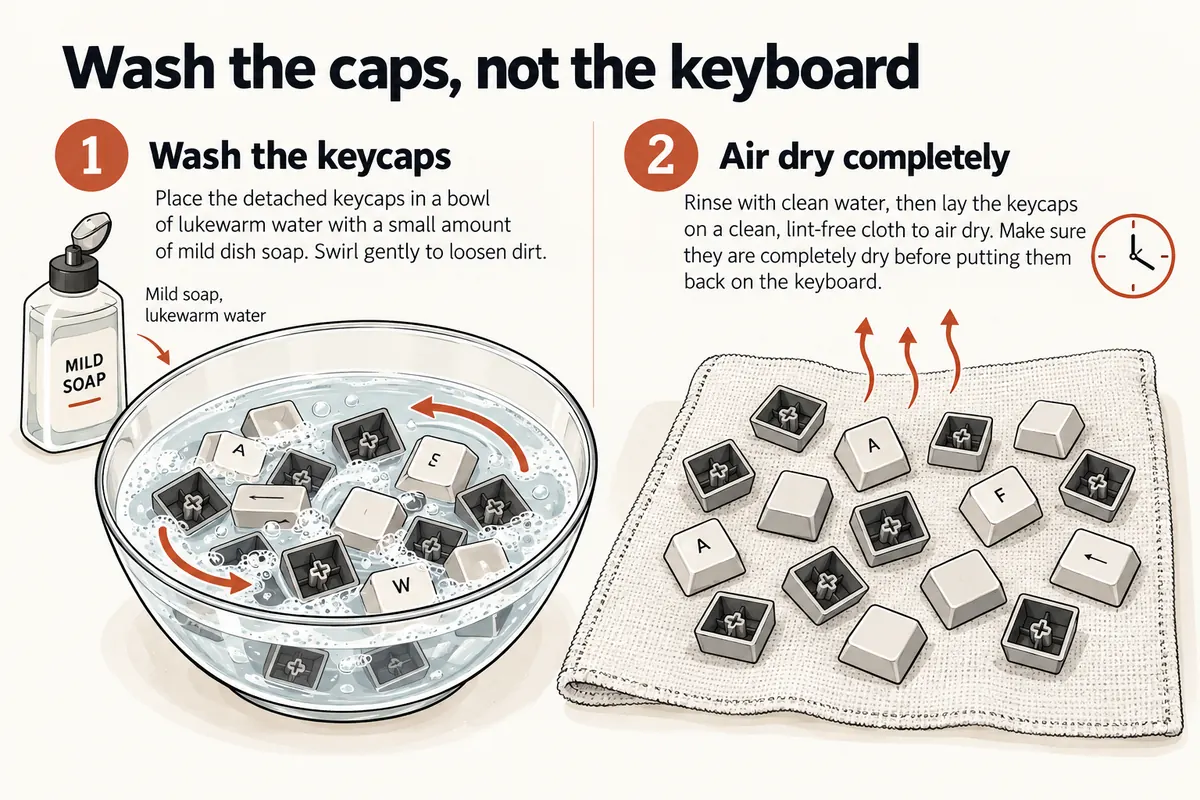
Never immerse the keyboard itself. There is no universal drying time: reinstall only when every cap, including its underside, is completely dry.
A hairdryer, oven or direct high heat is not a shortcut. Heat can deform plastics or affect coatings. Patience is safer than trying to meet an arbitrary number of hours.
What about isopropyl alcohol and compressed air?
Both appear in manufacturer cleaning instructions, but they are not universal permissions to apply either method everywhere. For example, Keychron’s mechanical keyboard cleaning guide mentions a small amount of isopropyl alcohol on persistent grime, while its support answer about frequent alcohol cleaning warns against repeated use. That is a reason to be precise about the surface, not to make one blanket rule for all boards.
For normal cleaning, start with a soft dry brush and a water-dampened cloth. If your keyboard’s manufacturer explicitly recommends alcohol for a particular surface, follow its instructions, test an inconspicuous spot, and apply it to the cloth rather than flooding a switch. Never assume an alcohol wipe is harmless to printed legends or painted cases.
Some manufacturers also permit compressed air for dust. If your board’s instructions allow it, use short, controlled bursts from a safe distance and keep aerosol cans upright to avoid liquid propellant. Do not use a high-pressure workshop compressor on delicate parts. Keychron’s basic care instructions list brushes, controlled air and small keyboard vacuums.
What if liquid was spilled on the keyboard?
A spill is not ordinary dust. Disconnect the keyboard immediately and do not test whether it still works. If there is a removable battery, follow the maker’s instructions for safely removing it; do not open a sealed battery enclosure.
Blot visible liquid without pushing it between keys. If liquid reached the switches, PCB or battery compartment, consult the manufacturer or a qualified repairer. Sugary drinks can leave conductive or sticky residue even after the water has evaporated. A quick surface wipe and a night on the desk do not prove the inside is safe.
Avoid powering on repeatedly to see whether the problem has disappeared. That can turn a recoverable spill into permanent damage.
Reassemble and check every key
When everything is dry, check your layout photograph and put the loose caps back on with straight, even pressure. Take care with stabilised keys. If a cap does not seat normally, stop and check its orientation and stabiliser attachment.
Reconnect the keyboard and test the keys in a text field. A key that now feels loose, binds or fails to register may be incorrectly seated or have a disturbed stabiliser. Do not force it down harder. Our switch anatomy guide shows the parts beneath an MX-style keycap.
How often should you clean a mechanical keyboard?
Give it a light brush and wipe whenever dust or skin oils become noticeable. A regular quick clean is less disruptive than unnecessary frequent disassembly. A deeper keycap-off clean is useful when debris collects on the plate, not because a calendar says you must strip the board each month.
The useful rule is simple: clean the accessible surfaces first, keep liquid away from the electronics, and only take apart what you know how to put back.
Related reading and sources
For component-specific care, see keycaps, stabilisers and fitting and tuning stabilisers. If you are planning more substantial modification, lubing switches is a different procedure with different tools.
Manufacturer guidance consulted: Keychron mechanical keyboard cleaning, Keychron key cleaning FAQ, and Keychron alcohol-care FAQ. These illustrations show generic mechanical keyboard parts, not product photographs or test results.