Keyboard Layout Reference
Identify common keyboard sizes, check ANSI versus ISO and keycap widths, and print a scale-checked ANSI 60% layout reference.
A keyboard’s size label tells you roughly which groups of keys it keeps. It does not establish the exact key count, keycap sizes or case dimensions. Start with the physical keys, then check the details that decide compatibility.
Identify the key groups
Look for the number pad first, then a separate navigation cluster, the function row and dedicated arrows. Compare what you see with this guide:
| Size family | What to look for | What still needs checking |
|---|---|---|
| Full-size | Number pad, function row and navigation cluster | Regional layout and bottom-row widths |
| 1800 / 96 percent | Number pad and function row in a more compact arrangement | Arrow and navigation positions vary |
| TKL | Function row and separate navigation cluster, without a number pad | ANSI or ISO, plus modifier sizes |
| 75 percent | Function row in a more compact arrangement than a TKL | Right Shift and navigation positions |
| 65 percent | Dedicated arrows without a separate function row | Right Shift and right-side key widths |
| 60 percent | The main typing area, usually without separate arrows | Standard, split-key and arrow variants differ |
| 40 percent | A compact typing area that typically moves numbers to layers | Board-specific keycap support and firmware layers |
These are families, not exact templates for every board. See the keyboard sizes guide for the tradeoffs, or choosing a size for help deciding.
Check ANSI versus ISO separately
Look at Enter and left Shift. ANSI commonly has a wide horizontal Enter. ISO uses a tall, inverted-L Enter and a shorter left Shift with an extra key beside it. Either arrangement can appear at multiple keyboard sizes.
The printable reference is ANSI only. It cannot verify an ISO keycap kit or plate. Use the ANSI versus ISO guide to compare the physical differences before buying.
Measure key positions in units
One unit, written u, represents nominal key spacing. At the conventional 19.05 mm pitch, the standard ANSI 60 percent example occupies a 15u by 5u key field: 285.75 by 95.25 mm. That is a spacing envelope, not the size of the plastic keycaps or the outer case.
Measure the spacebar, both Shift keys and the bottom-row modifiers. A matching percentage does not guarantee a matching kit. The keycap size reference explains unit measurements, and the keycaps guide explains kit coverage and profiles.
Use the printable reference
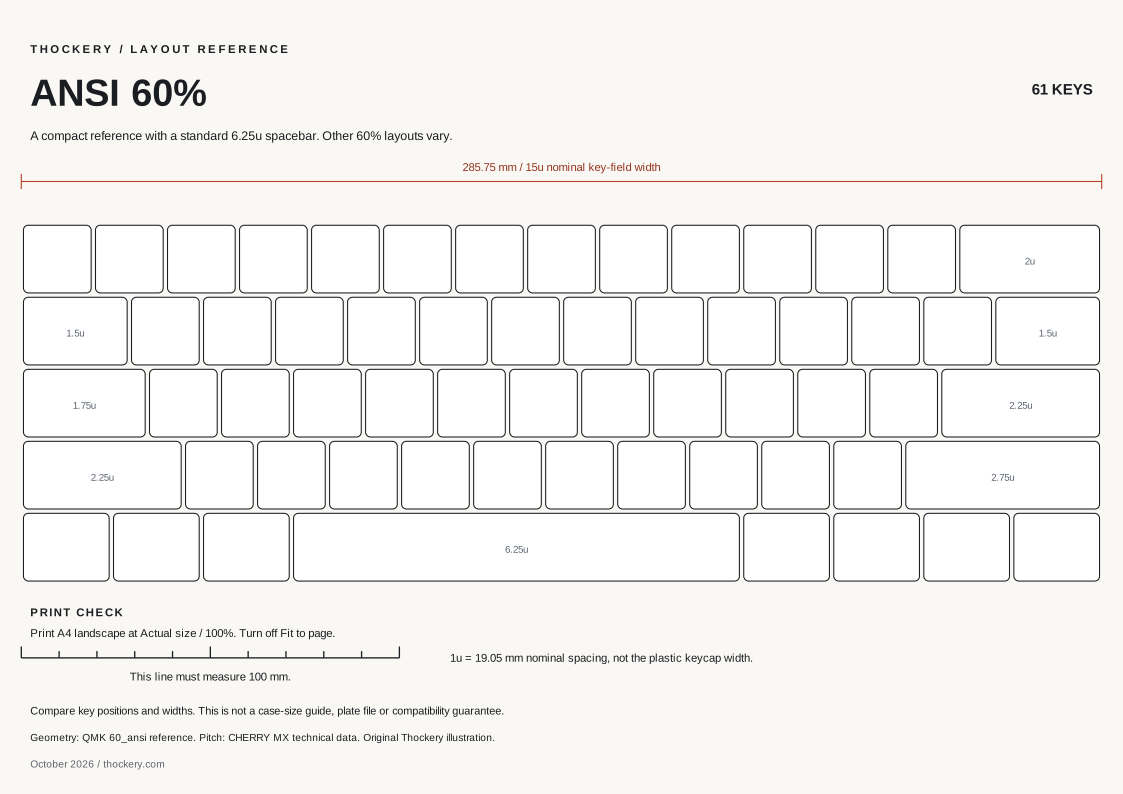
Original Thockery reference: 61 positions, standard ANSI row staggering and a 6.25u spacebar. Open the full-size file to read the width labels.
Open the printable ANSI 60% sheet (SVG, A4 landscape). Save the SVG from your browser to keep a local copy.
Print the SVG on A4 in landscape orientation at Actual size / 100%, with Fit to page disabled. Check the calibration line with a ruler: it must measure 100 mm before any comparison is useful. Printers and browser print dialogs can scale output, so a file’s dimensions alone do not prove the printed size.
Use it to understand positions and relative widths. Do not use it as a plate cutting file, drilling template, switch-clearance guarantee or case drawing.
Before ordering keycaps
- Confirm the board’s exact model and physical ANSI or ISO arrangement.
- Check spacebar, Shift and bottom-row sizes against the kit diagram.
- Check whether a split or compact board needs extra small modifiers.
- Check stem, switch height and profile compatibility separately.
- Keep the manufacturer’s layout or plate drawing as the final reference.
The catalog can help find the model and its recorded specifications. Start with keyboards or the comparison table.
Sources and revision
Rewritten October 20, 2026. Key coordinates and widths follow QMK’s ANSI 60% reference. The 19.05 mm nominal spacing follows CHERRY’s MX technical data, reproduced in this distributor’s document, page 7. The field dimensions above are calculated from those coordinates and spacing. Physical printer calibration has not been tested; measure the printed ruler before using the sheet.