Keyboard Latency Explained: Polling Rate, Scan Rate and Input Lag
Understand where keyboard input lag comes from, how polling and scan rates differ, and what actually matters when choosing a gaming keyboard.
A keyboard advertised as 8,000 Hz is not automatically eight times faster than one advertised as 1,000 Hz. Polling rate describes one part of the input path, not the total time between pressing a key and your computer receiving it.
To judge keyboard responsiveness, you need to separate switch actuation, matrix scanning, debouncing, firmware processing and communication with the computer. If you’re measuring when an action appears on screen, the computer, game and display add their own delays too.
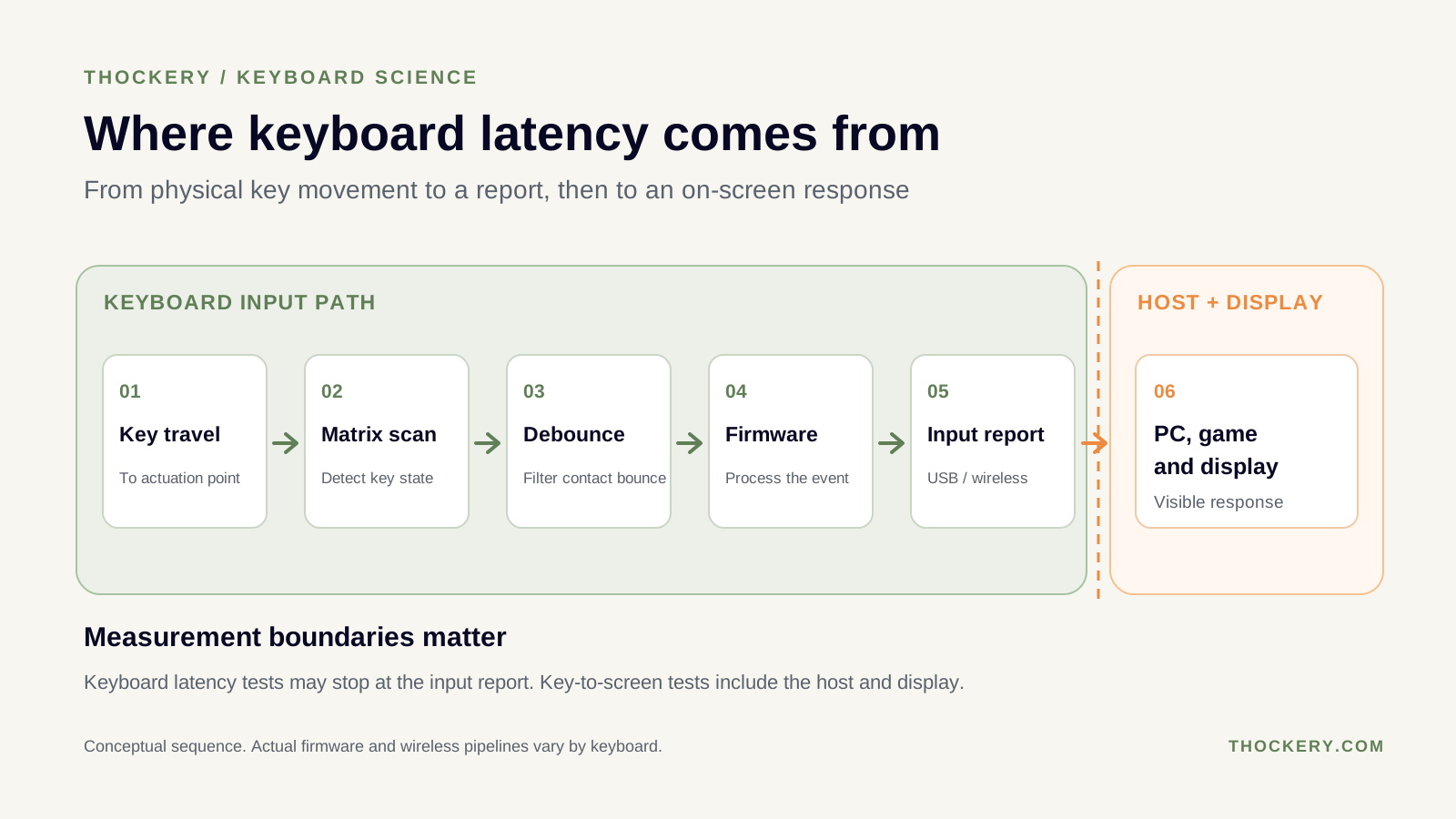
The measurement boundary matters: keyboard-side latency is not the same as key-to-screen delay.
What is keyboard latency?
Keyboard latency is the delay associated with turning a physical key press into input data delivered to a computer. The exact measurement depends on where the stopwatch starts and stops.
For example, RTINGS’ published keyboard-latency methodology begins its measurement when a test actuator first contacts the key and stops when it intercepts the keyboard’s report on its way to the computer. That includes physical key travel and keyboard-side processing, but not the game’s rendering or the monitor displaying the action.
A review reporting keyboard latency and a test reporting key-to-screen latency may therefore show different numbers without contradicting each other. Always check the methodology before comparing results.
Where does the delay come from?
1. Switch travel and actuation
A key must move far enough for the keyboard to recognise an input. The actuation distance and how quickly a person presses the key affect when this happens. A short actuation point can reduce the distance before detection, but it does not guarantee low total keyboard latency.
Read switches and switch anatomy for the parts involved.
2. Matrix scan rate
Most conventional keyboards detect key states by scanning an electrical matrix. Scan rate describes how frequently the keyboard checks that matrix. A change occurring just after a scan may wait until the next scan to be detected.
A high USB polling rate cannot recover time already spent waiting for the keyboard to detect a key. Internal scan rate and host-facing polling rate are separate specifications.
3. Debouncing
Mechanical switch contacts can briefly open and close several times during one press. Firmware uses a debounce strategy to prevent these fluctuations from becoming repeated keystrokes.
The latency effect depends on the algorithm. QMK’s debounce documentation describes deferred methods that wait for a stable state before reporting it, and eager methods that report an initial change immediately and suppress further changes for a defined interval. So a stated 5 ms debounce setting does not always mean 5 ms added to every keypress.
Reducing debounce too aggressively can create unwanted double inputs. Stable input matters more than an impressive setting.
4. Firmware and connection
After detection, the keyboard processes the input and sends a report. Wired USB, a dedicated wireless receiver and Bluetooth may have different reporting behaviour and delays. A good 2.4 GHz implementation can be competitive with wired models; Bluetooth often prioritises compatibility and power efficiency rather than minimum gaming latency.
Connection type alone is not a reliable substitute for measured results on the specific keyboard.
Polling rate vs scan rate
Polling rate describes how frequently input reports can be exchanged with the computer. Its reciprocal is the nominal reporting interval:
| Polling rate | Nominal interval |
|---|---|
| 125 Hz | 8 ms |
| 500 Hz | 2 ms |
| 1,000 Hz | 1 ms |
| 4,000 Hz | 0.25 ms |
| 8,000 Hz | 0.125 ms |
These figures are intervals, not measured keyboard latency. They do not include switch travel, scan timing, debounce or other processing. Moving from 1,000 Hz to 8,000 Hz shortens the nominal interval by 0.875 ms, not by a factor of eight for the complete keypress.
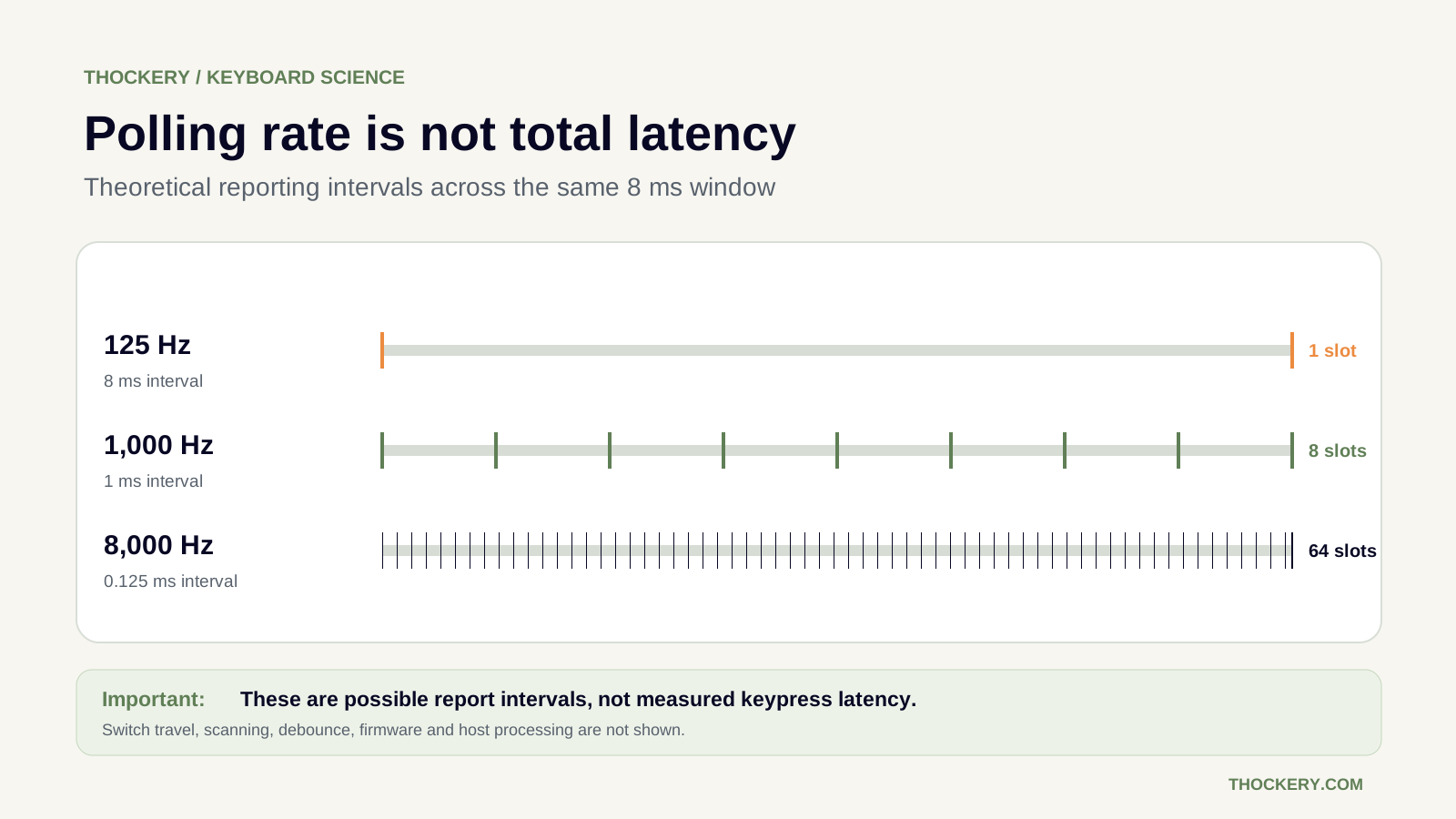
More report opportunities do not automatically mean proportionally lower keypress latency.
Does 8,000 Hz matter for gaming?
It can reduce the time a ready report waits for its next opportunity to be transmitted. But the improvement over 1,000 Hz is limited to a fraction of a millisecond at this stage of the pipeline. A keyboard with excellent scanning and firmware at 1,000 Hz may outperform a poorly implemented keyboard advertising 8,000 Hz.
For competitive gaming, prioritise independently measured keyboard latency and consistency over polling-rate marketing. For everyday typing, the practical benefit of extreme polling rates is often smaller than differences in layout, switch feel and reliability.
How to compare keyboard latency properly
- Use the same testing methodology. Different reviewers may measure from first contact, switch actuation or a simulated input event, and may stop at the USB report or the screen.
- Check the connection mode. Compare wired with wired, receiver with receiver, and Bluetooth with Bluetooth.
- Read the test settings. Debounce, actuation sensitivity, rapid trigger and firmware modes can change the result.
- Look for consistency. An average alone can hide occasional slow responses.
- Avoid browser-only latency claims. A webpage can observe events after the operating system delivers them; without specialised equipment it cannot isolate the physical keyboard’s true input latency.
Can you reduce keyboard input lag?
First, use the keyboard’s recommended low-latency mode and firmware, if available. If you use a wireless board for competitive gaming, test its dedicated receiver or wired connection rather than assuming Bluetooth performs the same. Check that the keyboard is actually using the reporting rate you selected.
Do not disable debounce blindly on a conventional contact switch. That may trade responsiveness for chatter and double typing. The right setting depends on switch condition and firmware algorithm.
If your main complaint is an action appearing late on screen, also consider the game, operating system and display. They are outside the keyboard-latency measurement and can contribute substantial delay.
Frequently asked questions
Is 1,000 Hz polling rate equal to 1 ms latency?
No. It corresponds to a nominal 1 ms reporting interval. Total keyboard latency includes other steps and must be measured separately.
Is 8,000 Hz eight times faster than 1,000 Hz?
It offers eight times as many potential reporting opportunities, not an eightfold reduction in total keyboard input delay.
Is wired always faster than wireless?
No. Modern dedicated wireless receivers can deliver competitive latency, while implementations vary. Compare measurements of the actual models and modes.
Does a Hall-effect switch automatically have zero latency?
No. Magnetic sensing changes how actuation is detected, but scanning, firmware, transmission and the rest of the system still take time.
Can a website accurately measure keyboard latency?
A website can time browser-delivered keyboard events, but cannot reliably measure the full physical-keypress-to-USB-report delay without external instrumentation.