Linear vs Tactile Switches
Linear switches move without a tactile bump. Tactile switches add resistance partway through the press. Compare the mechanisms and real indexed specifications.
The choice between linear and tactile switches is a choice about the shape of a keypress. A linear switch moves through its travel without a deliberate bump. A tactile switch adds resistance that rises and falls as a shaped part of the stem passes a metal leaf. Both register a keypress electrically. Only one deliberately signals part of that movement to your finger.
That difference is simple enough to describe, but a product page rarely tells you everything about it. An actuation-force figure does not measure the height or location of a tactile bump. A photo cannot show how a switch feels. And neither switch type is automatically faster, quieter or better for typing.


Both photographs are existing editorial assets from the Thockery switch index. Neither is a test or a measured comparison.
Where the tactile bump comes from
A mechanical MX-style switch has a stem, a spring, a housing and electrical contacts. Press the keycap and the stem moves downward against the spring. A shaped leg on the stem interacts with a flexible metal leaf inside the housing.
On a linear, the interaction does not create a pronounced change in resistance. The force generally rises as the spring compresses. The key still actuates before the stem reaches the bottom, but there is no deliberate tactile signal at that point.
On a tactile, the leg has a profile that makes the resistance rise and then fall during the press. Your finger can feel that change as a bump. Its prominence varies with the leg geometry, the contact-leaf spring and the switch’s overall construction.
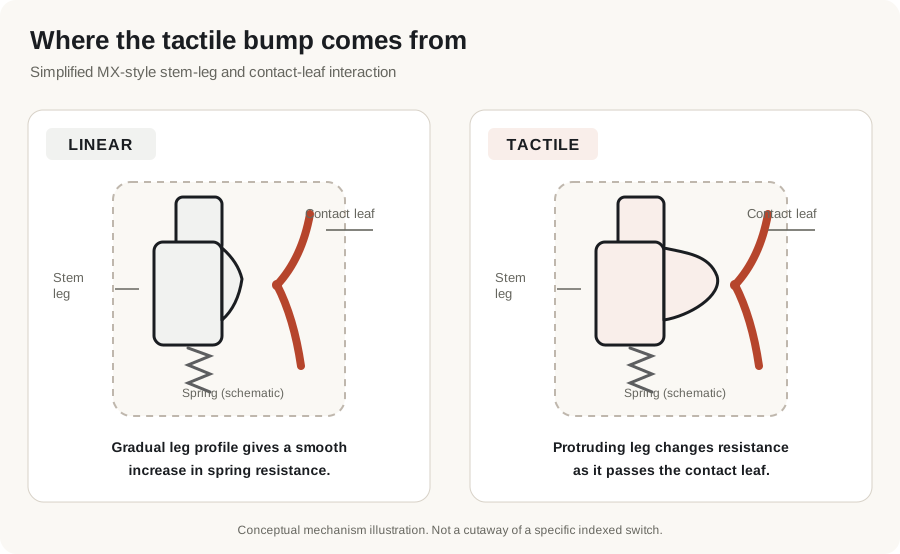
Simplified mechanism, not a cutaway of either product in the photographs. The metal leaf and stem profile are shown to explain the source of tactile resistance, not exact switch dimensions.
A tactile switch does not need an extra clicking mechanism. Tactile and clicky are different categories: a clicky switch adds a mechanism intended to make a distinct audible click. The bump itself does not mean a switch is clicky. Switch anatomy explains the rest of the mechanism.
The bump is not the actuation point
Actuation is the point at which the keyboard registers the press. Pre-travel is how far the stem moves before that happens. A tactile bump is a change in mechanical resistance.
Those events may be near one another, but they are not identical. In particular, a specification reading “2.0 mm pre-travel” locates actuation; it does not tell you where the bump begins, where resistance peaks, or how sharply it falls.
This distinction matters when comparing specifications. Two tactile switches can publish the same actuation force and pre-travel yet have quite different tactile mechanisms. You need a force-versus-travel measurement, or the opportunity to press both switches, to compare the shapes of their bumps directly. Thockery does not claim to have measured them.
Four examples from the Thockery index
The following diagram plots published travel distances, not tactile force. Each bar starts with the stem at rest, ends at the published total travel, and marks where actuation is specified to occur. The bars are drawn to one shared millimetre scale.
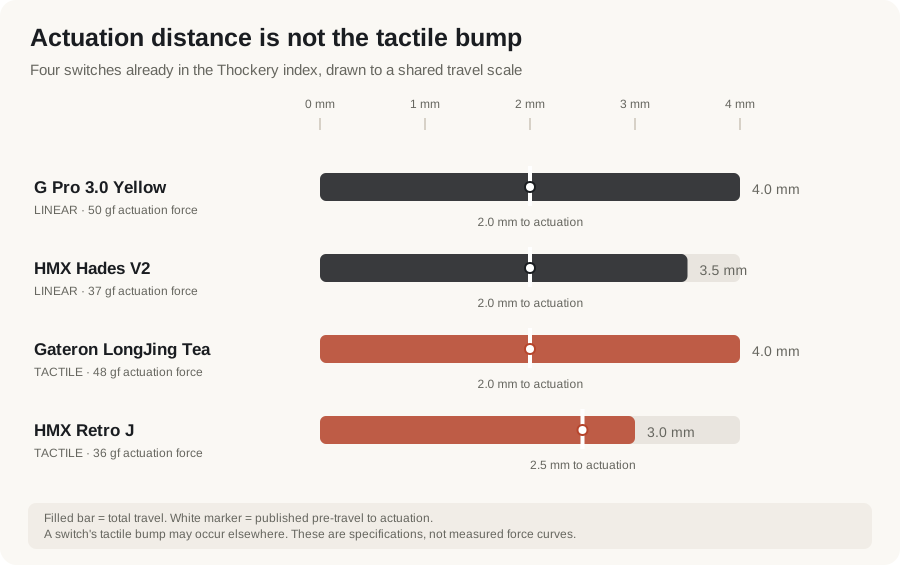
This is a comparison of recorded specifications, not a force curve or a test result. A tactile bump’s position cannot be inferred from the white marker.
All four examples below already have index entries and product photographs. Their specifications and check dates in the table are built directly from the same JSON records used on their detail pages. If a verified figure changes in the index, the table changes with it.
| Switch | Kind | Actuation | Bottom-out | Pre-travel | Total travel | Checked |
|---|---|---|---|---|---|---|
| Gateron G Pro 3.0 Yellow | linear | 50 gf | 67 gf | 2 mm | 4 mm | 2026-09-10 |
| HMX Hades V2 | linear | 37 gf | 42 gf | 2 mm | 3.5 mm | 2026-09-10 |
| Gateron LongJing Tea | tactile | 48 gf | 55 gf | 2 mm | 4 mm | 2026-09-10 |
| HMX Retro J | tactile | 36 gf | 55 gf | 2.5 mm | 3 mm | 2026-09-10 |


Product photographs are the existing editorial images stored with these four indexed entries. They show the actual listed products, not simulated colourways.
The useful comparison is not that one kind has more travel or a heavier spring. Both kinds span different figures. The important mechanical difference is the deliberate rise and fall in resistance on a tactile switch.
What the numbers can and cannot tell you
Actuation force is the force specified at electrical actuation. It is not necessarily the highest force you encounter during the press, particularly on a tactile switch with a distinct bump.
Bottom-out force is the force specified near the end of the key’s travel, when the stem reaches its stop. It can help distinguish spring weights, but comparing it with actuation force does not reconstruct the intervening force curve.
Pre-travel locates actuation along the movement. Total travel tells you how far the stem can move. Neither specifies the tactile bump’s shape.
There is one more practical limitation: not every maker or retailer publishes every figure. The index leaves those fields blank rather than making up measurements. Read “not published” in the comparison table literally, not as zero.
Which should you choose for typing or gaming?
For typing, the meaningful preference is whether you want a physical change in resistance during each press. A tactile bump can provide a cue through your fingertips. A linear press avoids that deliberate interruption. Neither mechanism guarantees higher typing speed, accuracy or comfort for everyone.
For gaming, linear switches are common because they do not interrupt the stroke with a deliberate bump. But the label alone does not establish faster input. Actuation position, keyboard firmware, scanning and the way a person uses the keys are separate factors. A tactile switch is not inherently unsuitable for games.
For shared spaces, do not confuse tactile with loud and linear with quiet. Both can make noise when the stem reaches the housing or springs back. Silent variants exist in both kinds, using dampening structures to reduce those impacts. The keyboard’s case, plate and mounting also influence the sound. Start with the silent switch entries if noise is the main constraint.
If you already have a switch you like, it is useful to compare another switch with similar published force and travel but the other mechanism. That narrows the difference you are trying to learn about. A small switch tester is more informative about the feel of a bump than a description full of adjectives.
The short answer
Choose linear if you prefer a keypress without a deliberate tactile bump. Consider tactile if you want to feel a change in resistance during travel. Then read the individual specification records, especially the figures the manufacturer has not published.
This article does not rank either type, and Thockery has not tested the products shown. Every named switch here is already in our switch index. For a broader introduction to switch types, clicky mechanisms and materials, start with Switches.